How We Built DMU Car Pool
A Smart University Carpooling Platform for Students & Staff
How We Built DMU Car Pool
A Smart University Carpooling Platform for Students & Staff
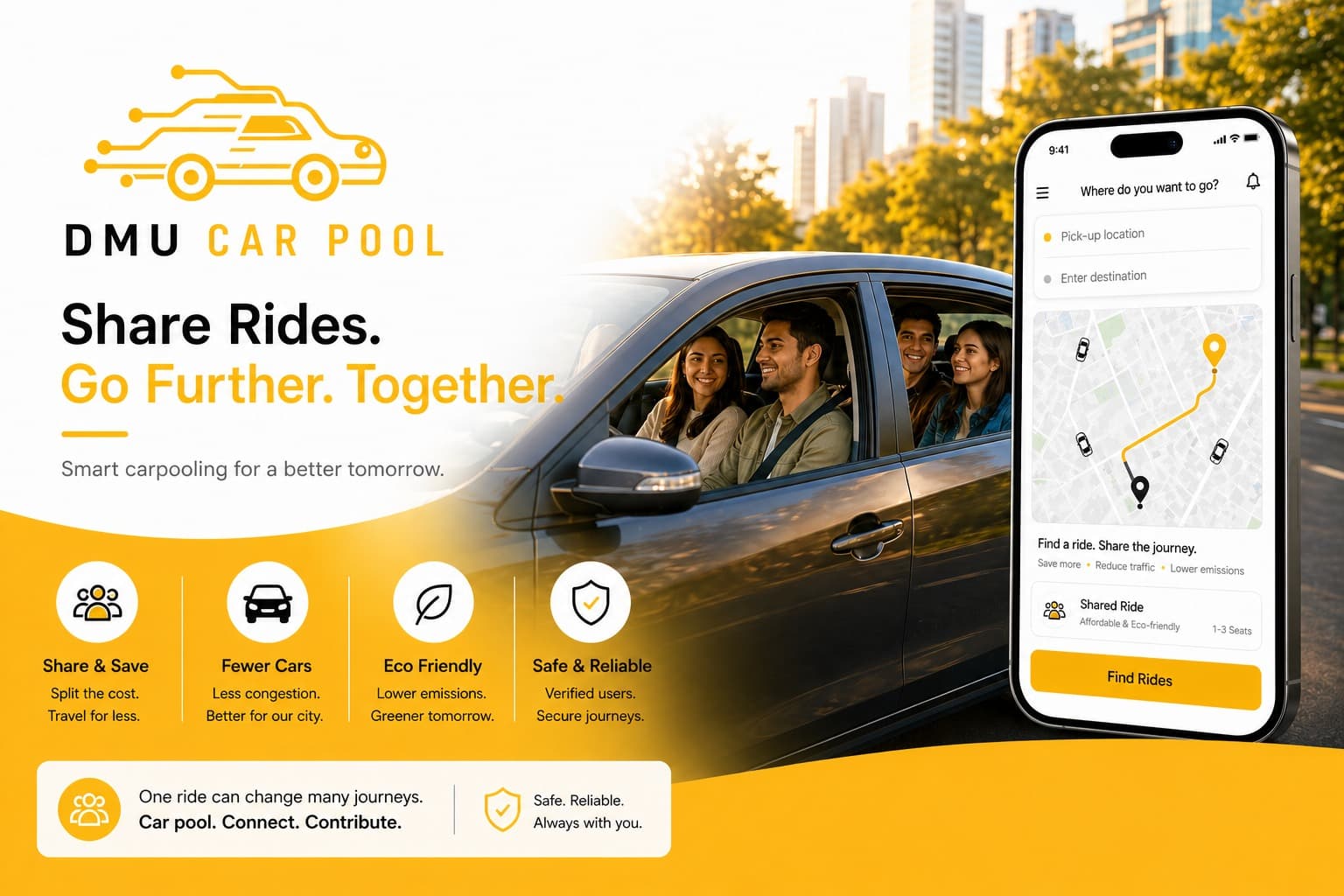
DMU Car Pool is a smart university-focused carpooling platform designed to help students and staff share rides, reduce travel costs, improve transport reliability, and support more sustainable commuting.
Unlike taxi-booking platforms, DMU Car Pool was designed around shared travel. The goal was not to charge taxi-style fares, but to help users travelling in similar directions split real journey costs fairly.
Table of Contents
- Introduction
- Problem Statement
- Proposed Solution
- Project Objectives
- User Roles
- Key Features
- System Architecture
- Data Flow Diagrams
- Database Design Overview
- Ride Matching Algorithm
- Smart Fare Calculation
- UI/UX Design Approach
- Security & Verification
- Technology Stack
- Development Challenges
- Results & Impact
- Future Enhancements
- Conclusion
1. Introduction
DMU Car Pool is a ride-sharing mobile application designed for the De Montfort University community. The platform allows students and staff to connect with others travelling in the same direction and share journeys in a more affordable, efficient, and environmentally friendly way.
The project was created to address real commuting issues faced by university students and staff, including high travel costs, unreliable public transport timings, limited parking, and the lack of trusted ride-sharing options within the university environment.
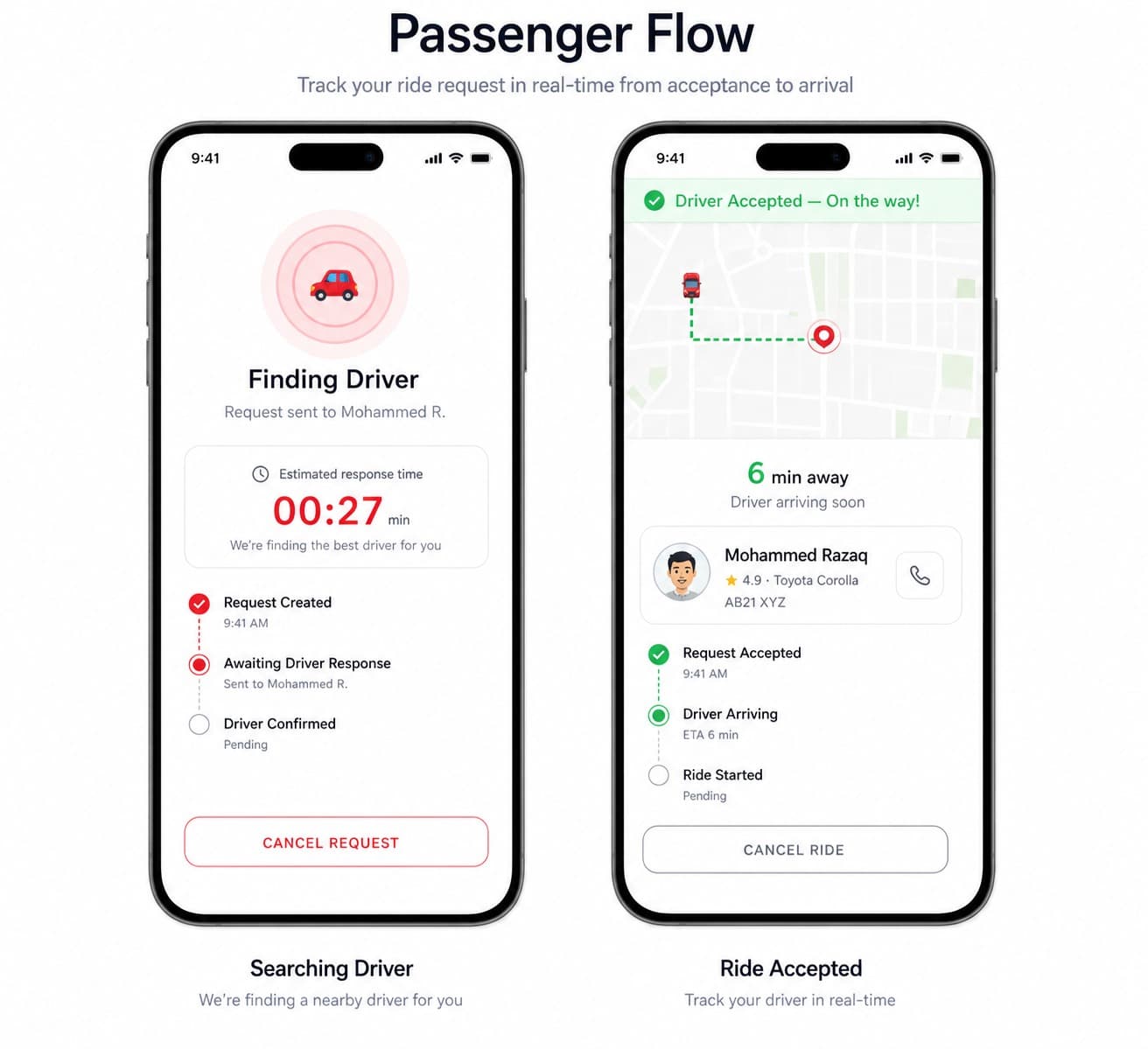
The application provides separate experiences for passengers, drivers, and administrators. Passengers can search for rides, request seats, and track ride progress, while drivers can post available trips, manage incoming requests, and organise accepted passengers efficiently.
2. Problem Statement
Many university students and staff face daily transport challenges.
These include:
- High taxi and private travel costs
- Expensive fuel prices
- Public transport schedules not matching academic timetables
- Limited parking availability near campus
- Students travelling alone while empty seats are available in cars
- Lack of trusted transport options late at night
- Increased congestion around university areas
- Higher environmental impact due to single-passenger car journeys
The core problem was not just transport availability. It was the absence of a trusted, university-focused platform that could match people travelling along similar routes and allow them to share costs safely.
3. Proposed Solution
The proposed solution was DMU Car Pool, a mobile platform where university users can either offer rides or request seats in available rides.
Drivers can:
- Post immediate trips
- Schedule future trips
- Add destination details
- Set available seats
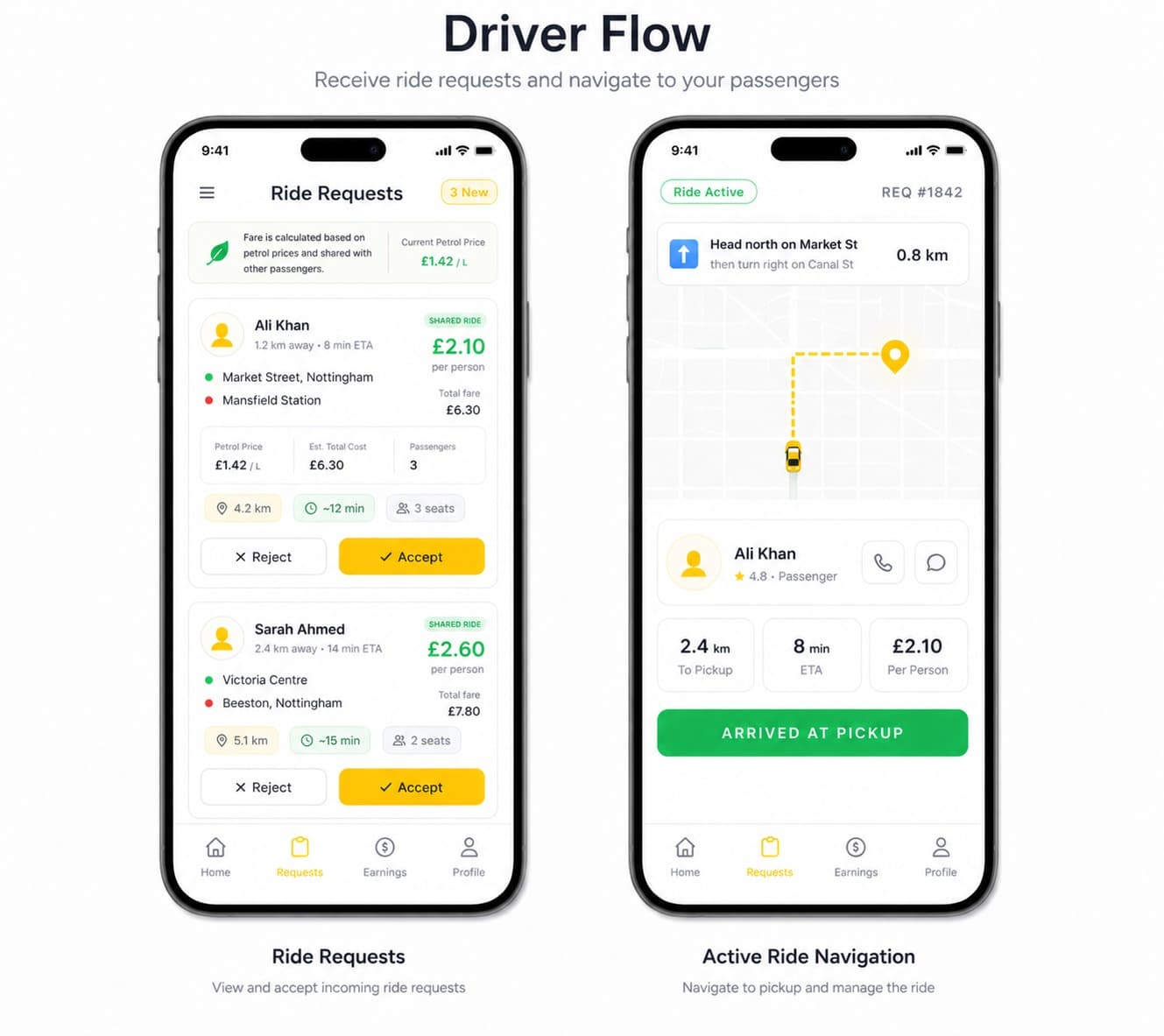
- Receive passenger requests
- Accept or reject passengers
- View accepted passengers
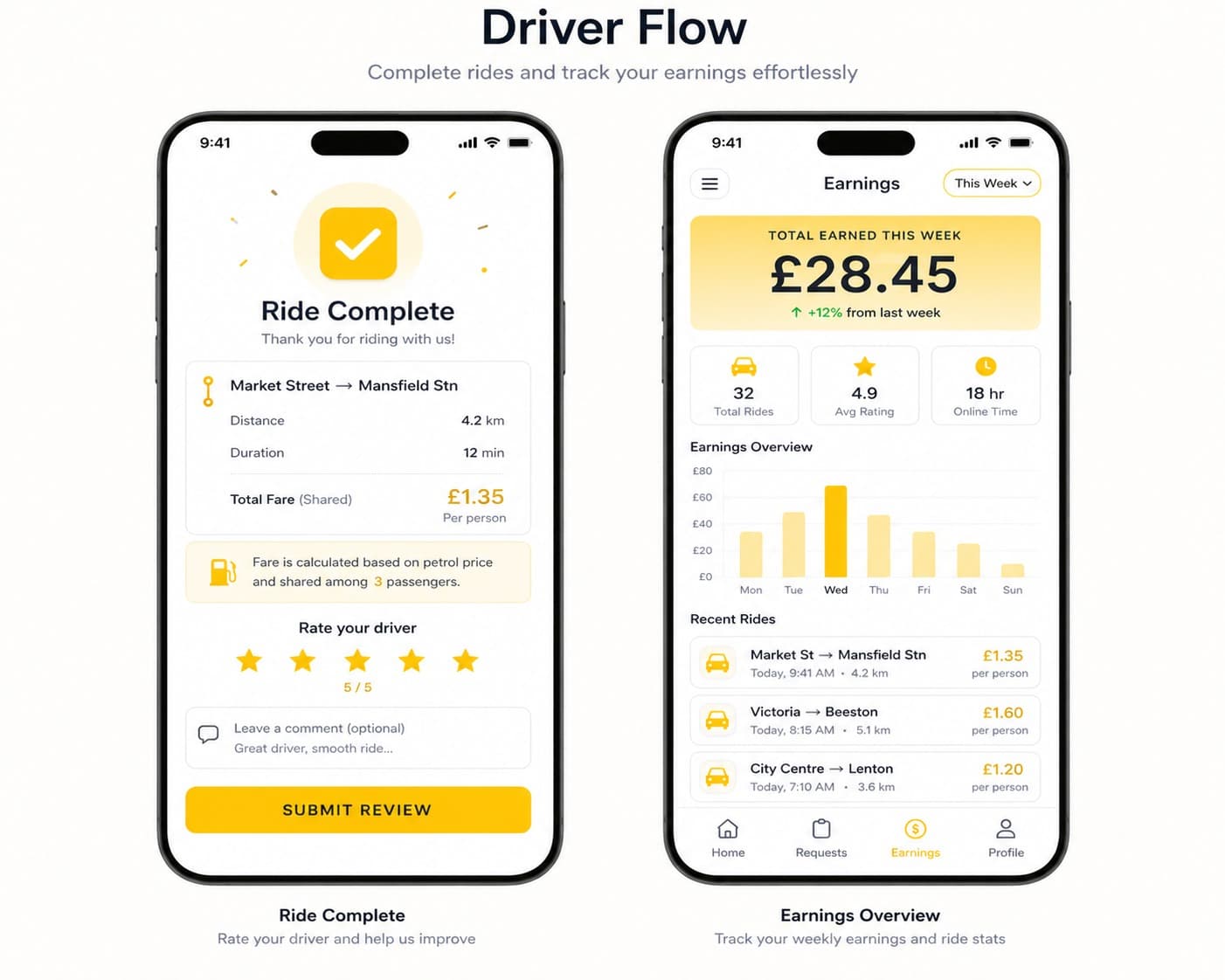
- Complete rides
Passengers can:
- Request immediate rides
- Schedule rides for later
- Search for matching drivers
- View driver details
- Send ride requests
- Receive ride status updates
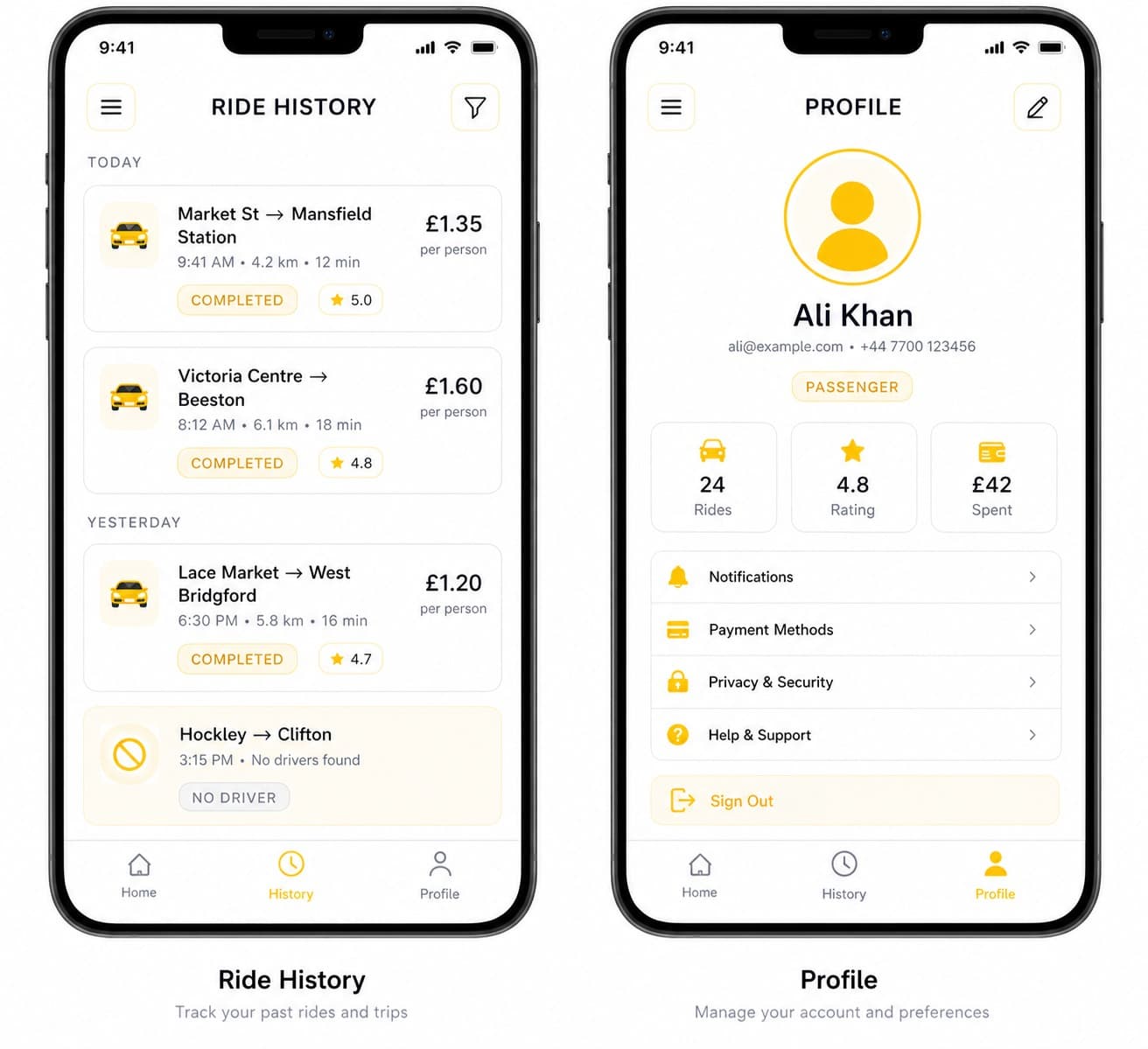
- View completed rides
Admins can:
- Review driver approval requests
- Verify uploaded driver documents
- Activate driver accounts
- Monitor platform users
The platform focuses on carpooling, not taxi booking. Drivers are everyday users already travelling to a destination, and passengers contribute towards the journey cost.
4. Project Objectives
The main objectives of the project were:
- Build a secure user registration and login system
- Support both driver and passenger roles
- Allow drivers to post immediate and scheduled rides
- Allow passengers to request immediate and scheduled rides
- Integrate maps and route planning
- Match passengers with suitable drivers using location and route logic
- Provide real-time updates through database and notification services
- Add driver verification to improve passenger trust
- Create a simple admin interface for account approval
- Design a user-friendly mobile interface
- Build the system in a scalable and maintainable way
5. User Roles
| Role | Description |
|---|---|
| Passenger | Searches for rides, sends requests, views drivers, and joins available trips |
| Driver | Posts rides, manages passenger requests, and completes trips |
| Admin | Reviews driver documents and activates approved driver accounts |
6. Key Features
Passenger Features
- Passenger registration and login
- Email verification
- Profile management
- Immediate ride request
- Scheduled ride request
- Pickup and drop-off location selection
- Matching driver list
- Driver profile view
- Ride request sending
- Ride status updates
- Completed ride history
Driver Features
- Driver registration and login
- Driver document upload
- Vehicle details upload
- Immediate ride posting
- Scheduled ride posting
- Seat availability management
- Incoming ride request management
- Accept or reject passenger requests
- View accepted passengers
- Passenger pickup ordering by proximity
- Ride completion flow
- Completed ride history
Admin Features
- Admin login
- View pending driver approvals
- Review driver details
- Review uploaded documents
- Activate approved driver accounts
- Manage user verification status
7. System Architecture
The system follows a mobile-first architecture with real-time database communication, map services, and notification support.
Mobile App
React Native
        |
        v
Backend
Django /
        |
        v
Database Layer
PostgreSQL
        |
        v
External Services
Google Maps API
Google Directions API
Firebase Cloud Messaging
Cloud Storage
The app is divided into three main parts:
- Passenger mobile interface
- Driver mobile interface
- Admin management interface
The passenger and driver interfaces share the same authentication foundation but provide different features based on the user role.
8. Data Flow Diagrams
Below are the diagrams of the system.
DFD Level 0 – Context Diagram
+------------------+          Search / Request Ride
|    Passenger     | --------------------------------+
+------------------+                                 |
                                                     v
                                          +----------------------+
                                          |   DMU Car Pool App   |
                                          +----------------------+
                                                     ^
                                                     |
+------------------+          Post Trips / Requests  |
|      Driver      | --------------------------------+
+------------------+

+------------------+          Verification / Reports
|      Admin       | -------------------------------->
+------------------+
DFD Level 1 – Ride Booking Process
Passenger
   |
   | Enters pickup and drop-off location
   v
[Ride Search Module]
   |
   | Converts locations into coordinates
   v
[Maps & Route Service]
   |
   | Generates route polyline
   v
[Ride Matching Algorithm]
   |
   | Searches active posted trips
   v
[Available Driver List]
   |
   | Passenger sends request
   v
[Ride Request Module]
   |
   v
Driver Receives Request
   |
   +---- Accept ----> Passenger added to ride
   |
   +---- Reject ----> Passenger notified
DFD Level 2 – Ride Matching Process
Passenger Pickup & Drop-off
        |
        v
Convert Address to Coordinates
        |
        v
Fetch Active Driver Trips
        |
        v
Check Driver Origin Near Passenger Pickup
        |
        v
Check Driver Destination Near Passenger Drop-off
        |
        v
If Match Found
        |
        v
Display Driver to Passenger

If No Direct Proximity Match
        |
        v
Decode Driver Route Polyline
        |
        v
Check Passenger Pickup Near Driver Route
        |
        v
Check Passenger Drop-off Near Driver Route
        |
        v
Display Route-Compatible Drivers
DFD Level 3 – Smart Fare Calculation
Trip Distance
Fuel Price
Vehicle Mileage
Number of Riders
        |
        v
Calculate Total Fuel Cost
        |
        v
Divide Cost Between Riders
        |
        v
Passenger Shared Fare
9. Database Design Overview
The system uses a structured database design to separate active ride data from completed ride history.
Users Collection / Table
Stores shared user information for both passengers and drivers.
| Field | Description |
|---|---|
| user_id | Unique user identifier |
| name | User full name |
| User email address | |
| phone | Contact number |
| role | Passenger, driver, or both |
| verified | Email/account verification status |
| profile_image | User profile picture |
| driver_documents | Driver verification documents |
| driver_account_active | Driver approval status |
A single user record supports both passenger and driver roles. This avoids duplication when a passenger later registers as a driver or a driver also wants to use the passenger interface.
Immediate Posted Trips
Stores active rides posted by drivers for immediate travel.
| Field | Description |
|---|---|
| trip_id | Unique trip ID |
| driver_id | Driver who posted the trip |
| origin | Driver starting location |
| destination | Driver destination |
| origin_geopoint | Starting coordinates |
| destination_geopoint | Destination coordinates |
| route_polyline | Encoded route from maps API |
| seats_available | Number of available seats |
| status | Active, full, started, or completed |
Scheduled Posted Trips
Stores rides posted by drivers for a future date or time.
| Field | Description |
|---|---|
| scheduled_trip_id | Unique scheduled trip ID |
| driver_id | Driver ID |
| departure_location | Future starting point |
| destination | Future destination |
| departure_date | Date of travel |
| departure_time | Time of travel |
| seats_available | Available seats |
| route_polyline | Saved planned route |
Ride Requests
Stores passenger ride requests.
| Field | Description |
|---|---|
| request_id | Unique request ID |
| passenger_id | Passenger making the request |
| trip_id | Related driver trip |
| pickup_location | Passenger pickup point |
| dropoff_location | Passenger destination |
| status | Pending, accepted, or rejected |
Ride History
Once a ride is completed, active ride data is moved into permanent ride history collections or tables.
This helps keep active search collections small and improves matching performance.
Chats / Messages
Supports in-app communication between drivers and passengers.
| Field | Description |
|---|---|
| chat_id | Unique chat ID |
| participants | Driver and passenger IDs |
| messages | Message subcollection/list |
| timestamp | Message time |
Ratings
Stores user ratings after completed rides.
| Field | Description |
|---|---|
| rating_id | Unique rating ID |
| from_user | User giving rating |
| to_user | User receiving rating |
| stars | Rating score |
| comment | Optional feedback |
10. Ride Matching Algorithm
The ride-matching algorithm is the core logic of DMU Car Pool.
When a passenger requests a ride, the system searches active posted trips and finds suitable drivers using two main conditions:
- Proximity-based matching
- Route-based matching
This approach ensures that drivers are matched only when the journey is practical and does not require a major detour.
Step 1: Passenger Submits Ride Request
The passenger enters:
- Pickup location
- Drop-off location
- Ride type: immediate or scheduled
The entered locations are converted into geographic coordinates using a geocoding service.
Step 2: Passenger Route Is Generated
The system uses the Google Directions API to calculate the passenger’s route.
The API returns the route as an encoded polyline. This route can later be compared with driver routes.
Step 3: System Fetches Active Driver Trips
The algorithm searches active posted trips from the database.
- For immediate rides, it checks immediate posted trips.
- For scheduled rides, it checks scheduled posted trips.
The algorithm only searches active collections, not completed ride history, which improves performance.
Step 4: Proximity-Based Matching
The first matching condition checks whether the driver’s origin and destination are close to the passenger’s pickup and drop-off points.
The algorithm checks:
- Distance between driver origin and passenger pickup
- Distance between driver destination and passenger drop-off
If both distances are within the allowed threshold, usually around 10 km, the driver is considered a suitable match.
Driver Origin  ---- distance check ---- Passenger Pickup
Driver Destination ---- distance check ---- Passenger Drop-off
This ensures that the driver is close enough to pick up and drop off the passenger without a major route change.
Step 5: Route-Based Matching
If the driver does not pass the direct proximity check, the algorithm performs route compatibility matching.
This works by:
- Decoding the driver’s saved route polyline
- Extracting route points from the polyline
- Comparing passenger pickup location with points on the driver route
- Comparing passenger drop-off location with points on the driver route
- Checking whether both points are within an acceptable distance threshold
If the passenger pickup and drop-off are close to the driver’s route, the driver is shown as a match.
This is useful because a driver may not start near the passenger, but their route may still pass near the passenger’s pickup point.
Step 6: Distance Calculation
The algorithm calculates distance between geographical coordinates using the Haversine formula.
This is used to compare:
- Driver origin and passenger pickup
- Driver destination and passenger drop-off
- Passenger pickup and driver route points
- Passenger drop-off and driver route points
The Haversine formula is suitable because it calculates real-world distance between latitude and longitude points.
Step 7: Display Matching Drivers
Once suitable drivers are found, the passenger sees a list of matching ride options.
The passenger can then:
- View driver details
- Check available seats
- Send a ride request
- Wait for the driver to accept or reject
Step 8: Driver Accepts or Rejects Request
The driver receives the request and can either accept or reject it.
If accepted:
- The passenger is added to the ride
- Seat availability is updated
- The passenger receives confirmation
If rejected:
- The passenger is notified
- The passenger can request another available ride
Step 9: Passenger Ordering for Driver
Once multiple passengers are accepted, the system helps the driver by organising passengers based on proximity.
The closest passenger is shown first, followed by the next closest passenger.
This helps the driver plan pickups efficiently and reduces unnecessary travel.
11. Smart Fare Calculation
The platform is designed for carpooling, so the fare should be based on cost sharing, not profit.
Instead of charging taxi-style prices, the system can calculate a fair contribution based on:
- Trip distance
- Fuel price
- Vehicle fuel efficiency
- Number of riders
- Optional platform/service fee
Fare Formula
Fuel Required = Trip Distance / Vehicle Mileage

Fuel Cost = Fuel Required × Fuel Price

Shared Fare = Fuel Cost / Number of Riders
Example
Trip Distance: 20 miles
Fuel Cost: £8
Total Riders: 4

Shared Fare = £8 / 4
Shared Fare = £2 per person
This makes the ride cheaper for passengers while helping drivers recover part of their travel cost.
The pricing model supports the main purpose of the platform: affordable university commuting.
12. UI/UX Design Approach
The interface was designed to be simple, clean, and easy to use.
The visual direction uses a yellow and white theme, matching the identity of DMU Car Pool.
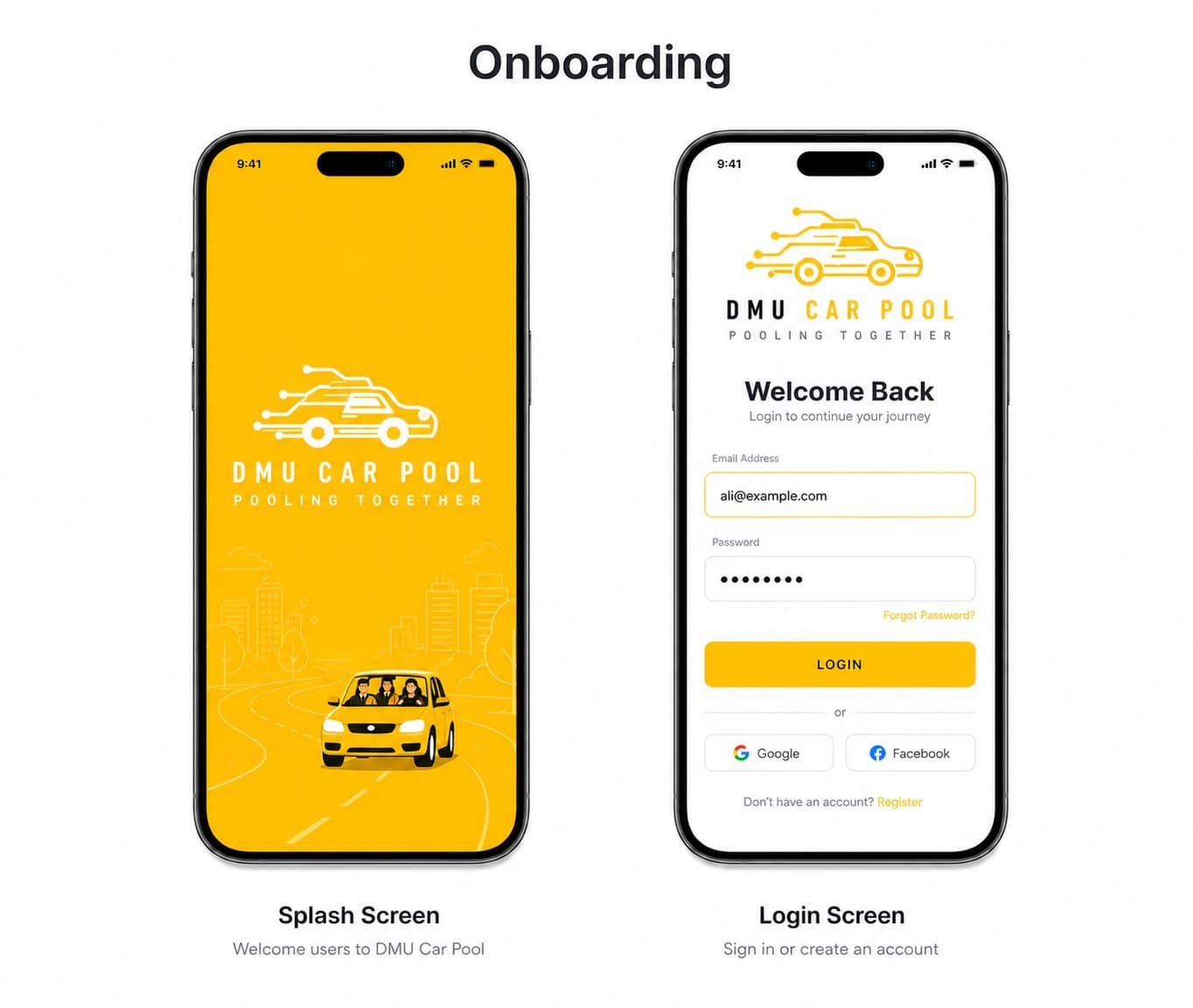
Login Page
The login screen is designed to be minimal and clear.
It includes:
- App logo
- Email input
- Password input
- Login button
- Registration link
- Password reset option
The goal is to let users access the app quickly without confusion.
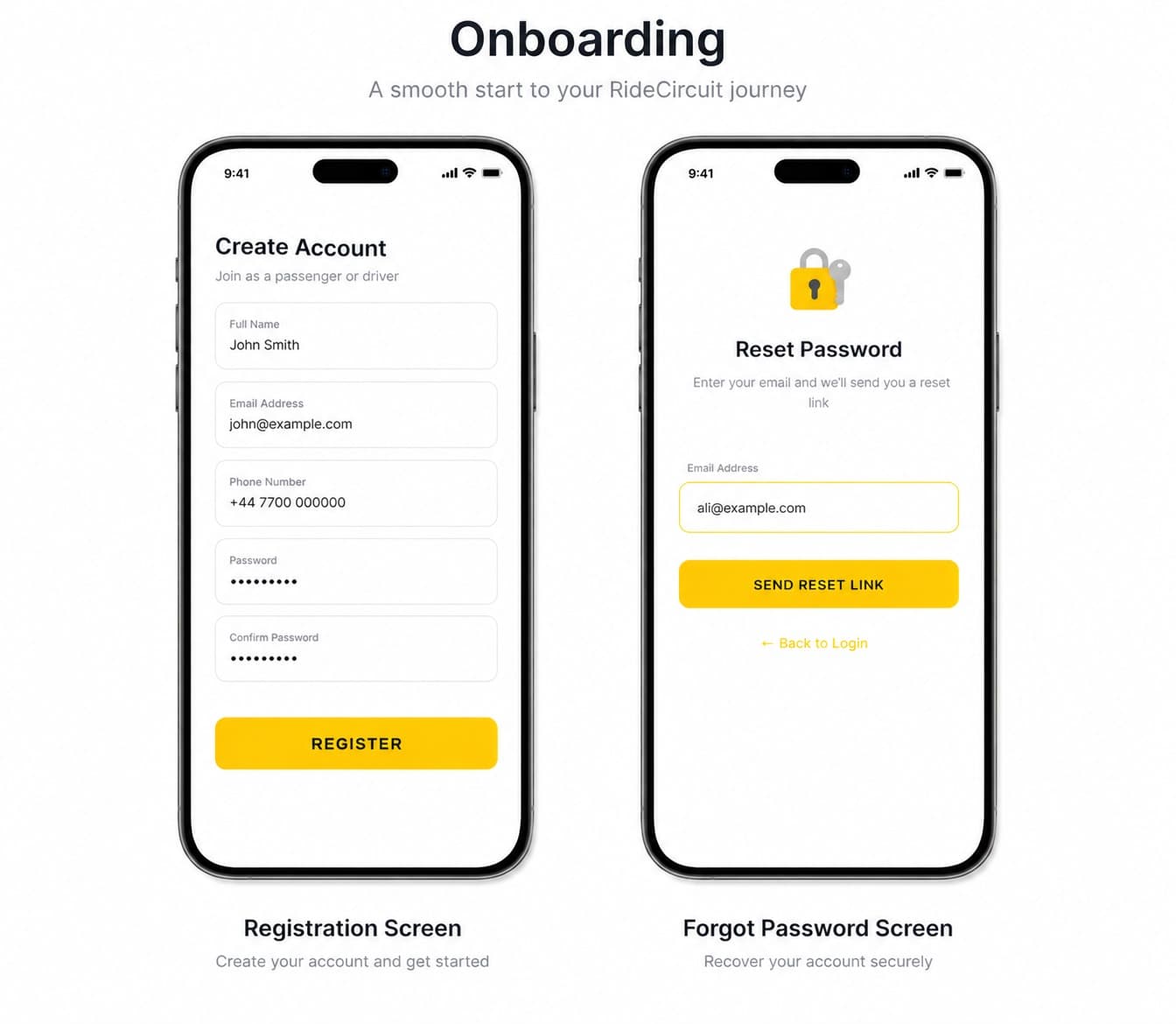
Registration Page
The registration process supports both passenger and driver users.
Passengers can create an account with basic details.
Drivers provide additional information, including:
- Vehicle details
- Insurance document
- ID document
- Driving-related verification details
Drivers must be approved before they can fully use driver features.
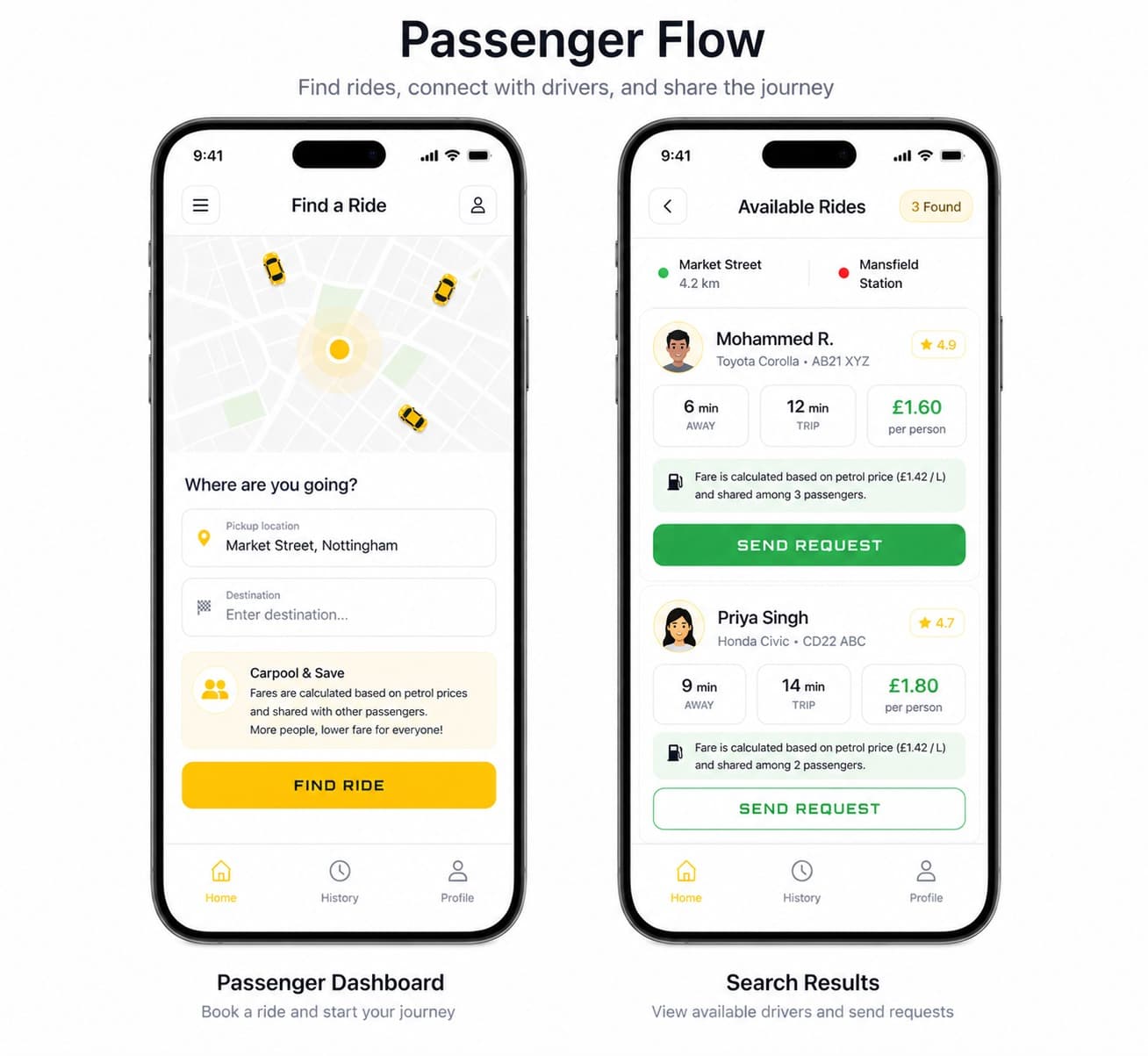
Passenger Dashboard
The passenger dashboard focuses on ride discovery.
It includes:
- Search bar for destination
- Pickup and drop-off inputs
- Map view
- Available ride cards
- Driver details
- Ride request button
- Ride updates
The design helps passengers quickly find rides that match their journey.
Driver Dashboard
The driver dashboard focuses on trip management.
It includes:
- Post ride button
- Scheduled ride option
- Available seats input
- Incoming requests
- Accepted passengers
- Start ride button
- Complete ride button
The dashboard gives drivers a clear view of their active rides and requests.
Admin Interface
The admin interface is designed for simple verification tasks.
It allows admins to:
- View pending driver requests
- Check driver documents
- Approve drivers
- Activate driver accounts
This helps maintain trust and safety across the platform.
13. Security & Verification
Security and trust were important because the app connects real users for shared travel.
The platform includes:
- Secure authentication
- Email verification
- University email validation
- Password reset
- Role-based access
- Driver document verification
- Admin approval before driver activation
- Ride history logging
- Profile images for identification
- Ratings and feedback support
Driver verification is especially important because passengers need confidence before sharing rides.
14. Technology Stack
| Layer | Technology |
|---|---|
| Mobile App | React Native |
| Backend | Django |
| Database | PostgreSQL |
| Authentication | JWT Authentication |
| Maps | Google Maps API |
| Route Planning | Google Directions API |
| Notifications | Firebase Cloud Messaging |
| File Storage | Firebase Storage / Cloud Storage |
| Admin Panel | Web-based admin dashboard |
| Hosting | AWS / DigitalOcean |
| Version Control | GitHub |
15. Development Challenges
Challenge 1: Optimising the Matching Algorithm
The first version of the algorithm compared the full route of the passenger with the full route of the driver.
This approach was detailed, but it required many calculations and became slow when there were multiple ride requests.
To improve this, the algorithm was redesigned to focus on the most important journey points:
- Passenger pickup location
- Passenger drop-off location
- Driver origin
- Driver destination
- Driver route points
This reduced unnecessary calculations and made the matching process faster.
Challenge 2: Reducing Database Search Load
Searching a large number of trips can slow down the system.
To solve this, the database was structured so that active trips and completed trips are stored separately.
- Active trips are stored in temporary collections or tables.
- Completed trips are moved into ride history.
This means the matching algorithm only scans active rides, not old completed data.
Challenge 3: Building Trust Between Users
Carpooling requires trust between passengers and drivers.
This was solved through:
- Email verification
- Driver document upload
- Admin approval
- Profile details
- Ride history
- Ratings support
This makes the platform more suitable for a university environment.
Challenge 4: Supporting Immediate and Scheduled Rides
The system needed to support both instant ride requests and future planned journeys.
To solve this, separate ride flows were designed:
- Immediate posted trips
- Immediate requested trips
- Scheduled posted trips
- Scheduled requested trips
This separation made the system easier to manage and improved the ride-matching logic.
16. Results & Impact
DMU Car Pool provides a practical transport solution for university students and staff.
Expected benefits include:
- Lower commuting costs
- Better use of empty car seats
- Reduced parking pressure
- Reduced traffic congestion
- Lower carbon emissions
- Safer university-based ride sharing
- Improved transport reliability
- Stronger campus community
The project demonstrates how mobile technology, geolocation services, and smart matching logic can be used to solve a real-world transport problem.
17. Future Enhancements
Future improvements could include:
- Dynamic fuel-price integration
- Automatic fare updates based on live petrol prices
- In-app payments
- Emergency SOS button
- Women-only ride option
- AI-based ride prediction
- Subscription plans for frequent commuters
- Multi-university expansion
- Advanced driver rewards
- Carbon-saving dashboard
- Better route optimisation for multiple passengers
18. Conclusion
DMU Car Pool successfully transforms university commuting into a smarter, cheaper, and more sustainable shared transport experience.
Instead of relying on expensive taxis or travelling alone, students and staff can share rides with trusted university users and split real journey costs fairly.
The project demonstrates skills in:
- Mobile app development
- Real-time ride booking
- Location-based services
- Route matching algorithms
- Database design
- User verification
- Admin management systems
- Scalable transport platform design
DMU Car Pool is not just a ride-booking app. It is a university-focused carpooling solution designed to make commuting more affordable, safer, and environmentally responsible.